HOW TO TRACK MY ORDER? | DHgate Tips
DHgate Tracking: A Complete Guide to Tracking Your Orders
If you’ve ever bought something online (and let’s be real, who hasn’t?), you know the excitement of hitting that "purchase" button. But that excitement often comes with a nagging question: Where is my package? If you've recently placed an order on DHgate, a popular online marketplace for wholesale products, you might find yourself checking your tracking information over and over, hoping your package isn’t floating in a sea of logistics limbo. Well, don’t worry, I’ve got you covered with a simple guide to tracking your DHgate orders. Buckle up, because we're diving into the world of online shopping logistics with a dash of humor and a lot of helpful tips.
Step 1: Accessing Your DHgate Tracking Information
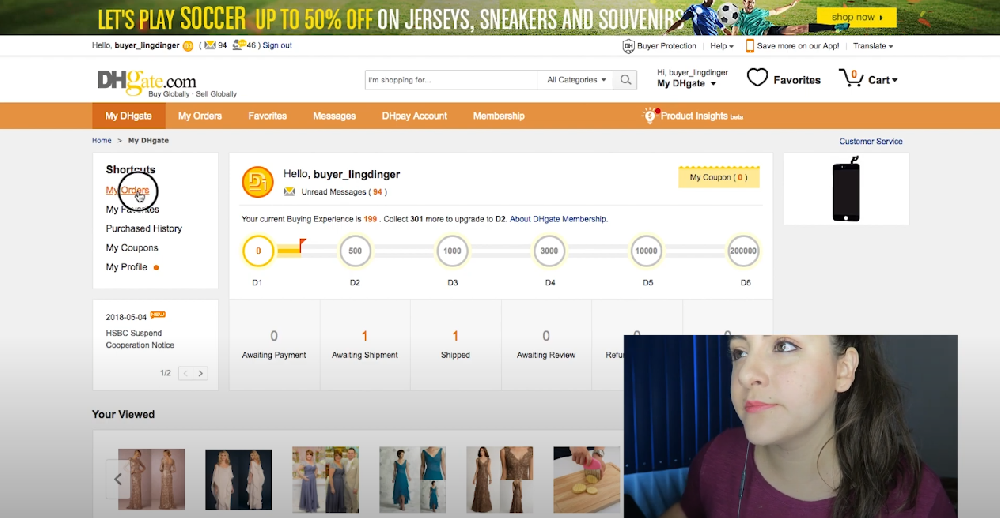
First thing’s first: to track your order, you need to access the DHgate website or app. If you’ve already got an account (and if not, what are you doing with your life?), follow these simple steps:
Log into your DHgate account:
Open the DHgate website or app and log in using your credentials. If you don’t have an account, go ahead and create one. It takes a minute, and you’ll get to track all your orders in one place. Fancy!Go to "My Orders":
Once logged in, head to the “My Orders” section from the main menu. It’s like the control center for all your purchases. Don’t worry, no aliens are involved here—just your products, their tracking, and the occasional cosmic mystery of delayed shipments.Find the Order You Want to Track:
Find the order you need tracking for and click on the "View Details" or “Track Order” button. The exact text may vary, but you get the idea.
Step 2: Understanding DHgate Tracking Information
Once you click that button, you’ll see tracking details. This might be in the form of a tracking number and the name of the courier (like China Post, EMS, or DHL). If you’ve got multiple orders or orders coming from different suppliers, the tracking info might look a bit different for each one. Here’s how to make sense of it:
Tracking Number: A unique number that helps you track your package across various carriers. It’s like your order’s personal ID card.
Carrier Name: The shipping company handling your order. Some of the popular carriers include China Post, EMS, and DHL, but this depends on the seller and your location.
Delivery Status: Look for phrases like “In Transit,” “Out for Delivery,” or “Delivered.” If it says “In Customs,” grab a cup of coffee and prepare for some patience.
Step 3: What to Do If Your DHgate Order is Delayed
Delays happen. It’s the nature of international shipping, especially when it’s crossing borders and oceans. But don’t panic, you’ve got options. Here’s what to do if your package seems to be taking the scenic route:
| Problem | Solution |
|---|---|
| Package stuck at customs | Check with the courier (often requires extra documentation). |
| Package not moving for days | Wait a couple more days—sometimes tracking updates are slow. |
| Tracking hasn’t updated | Contact DHgate customer service for help. |
| Package lost or never delivered | File a dispute or request a refund via DHgate. |
Pro Tip: If the tracking hasn’t updated for several days, don’t start pacing around in circles. International shipments can sometimes be held up due to customs or just sheer bureaucracy. You might see a sudden update out of nowhere. Like magic… except not. Just logistics.
Step 4: Using Third-Party Tracking Websites
If you’re still feeling lost in tracking limbo, don’t despair. You can use third-party websites to track your DHgate orders. Websites like 17track.net and Track24 allow you to input your tracking number and follow your package’s journey across multiple carriers, all in one place.
Here’s a quick guide:
Copy the Tracking Number from DHgate.
Go to a third-party tracking website like 17track.net.
Paste the tracking number into the search bar and hit "Track."
See the magic unfold (well, the package journey unfold—but magic sounds more fun).
Step 5: What If My Package Never Arrives?
This is where things can get tricky, but don’t worry—you have options:
Wait It Out: Sometimes international shipments can be delayed for various reasons (customs, weather, a rogue delivery truck). Wait at least 10-14 days after the expected delivery date.
Contact DHgate: If your package doesn’t show up within that timeframe, contact DHgate customer service. They’re actually pretty responsive and will help you track down your order.
Open a Dispute: If after a few weeks there’s still no sign of your package, you can open a dispute through DHgate. They’ll investigate the issue and offer solutions, like a refund or a replacement.
Step 6: How to Avoid Tracking Issues in the Future
Now that you’re a DHgate tracking pro, let’s make sure you don’t get stuck with problems again:
Always double-check the seller’s shipping methods: Some sellers offer faster shipping options. You might pay a bit more, but your package will arrive quicker.
Opt for a reliable carrier: If you see DHL or FedEx as the courier, that’s often a good sign. They’re known for reliable, timely deliveries.
Keep an eye on your tracking: Don’t wait until the last minute. Check it regularly to stay updated and spot any issues early.
Conclusion: Relax, Your Package is On the Way!
In the end, tracking a DHgate order is all about staying patient, staying informed, and occasionally checking that tracking number as though it holds the secret to the universe. If all else fails, contact DHgate support, and remember: this too shall pass (usually with a tracking update, a lot of patience, and maybe a side of coffee). Keep your cool, and your package will show up at your door before you know it. Happy shopping!